GSTR-9 Reconciliation Format in Excel: Free Annual Sheet
GSTR-9 reconciliation format in Excel, free: compare GSTR-1, 3B, 2B and books per tax head, month by month, and find the gap before you file.
GSTR-9 is due by 31 December after the financial year ends, and once it's filed it can't be revised. Any difference you find afterwards gets paid through DRC-03 or explained to an officer. So the reconciliation has to happen first. For ITC it has to happen even earlier: credit you missed during the year can only be claimed in a GSTR-3B filed by 30 November after the year ends.
This page gives you a free GSTR-9 reconciliation format in Excel. It's one workbook that compares GSTR-1, GSTR-3B, GSTR-2B and your books month by month, per tax head, and labels every year total with the GSTR-9 table to compare it with. Fill in the twelve months, read the Status column, and you know which months need work. With the year's GSTR-1, 3B and 2B summaries open, that's about ten minutes.
Free GSTR-9 reconciliation sheet (download)
The sheet does three comparisons for one financial year and adds them up for GSTR-9. You type the numbers; the differences, statuses and year totals fill themselves.

| Sheet | Compares | Where each number comes from | Compare with in GSTR-9 |
|---|---|---|---|
| Output Tax | GSTR-1 vs GSTR-3B vs Books, per tax head | GSTR-1 summary (with GSTR-1A and IFF), net of credit/debit notes · GSTR-3B Table 3.1 rows (a) and (b) · your output GST ledgers | Table 4 (tax paid: Table 9) |
| Input Tax (ITC) | GSTR-2B vs GSTR-3B vs Books, per tax head | GSTR-2B summary, "ITC Available" (Part A, net of credit notes) · GSTR-3B Table 4(A) · your input GST ledgers or Purchase Register totals | 6A (from 3B); 8A (from 2B) |
| Turnover | GSTR-1 vs GSTR-3B vs Books | Taxable value without GST: GSTR-1 summary · 3B Table 3.1 (a) + (b) · sales account | Table 4 + zero-rated part of Table 5 |
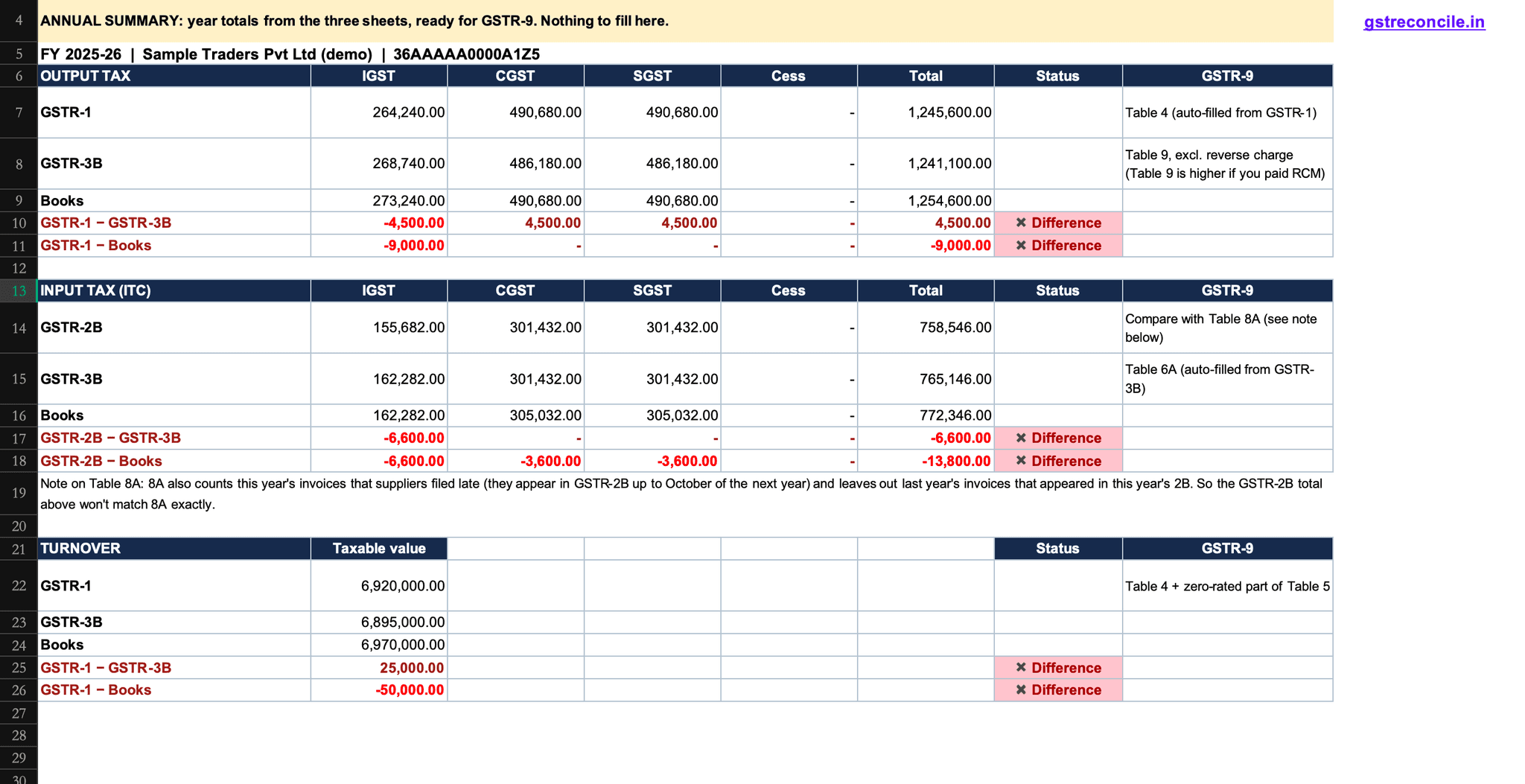
| Annual Summary | Year totals of all three | Nothing to fill | Labels each line with its table |
| How to use | Settings, sources, what a difference means | Business name, GSTIN, FY start year | — |
Every comparison is per head: IGST, CGST, SGST and Cess separately, with a ✔ Matched or ✖ Difference status for each month. There's no tolerance; a ₹1 difference shows.
How to fill it, month by month
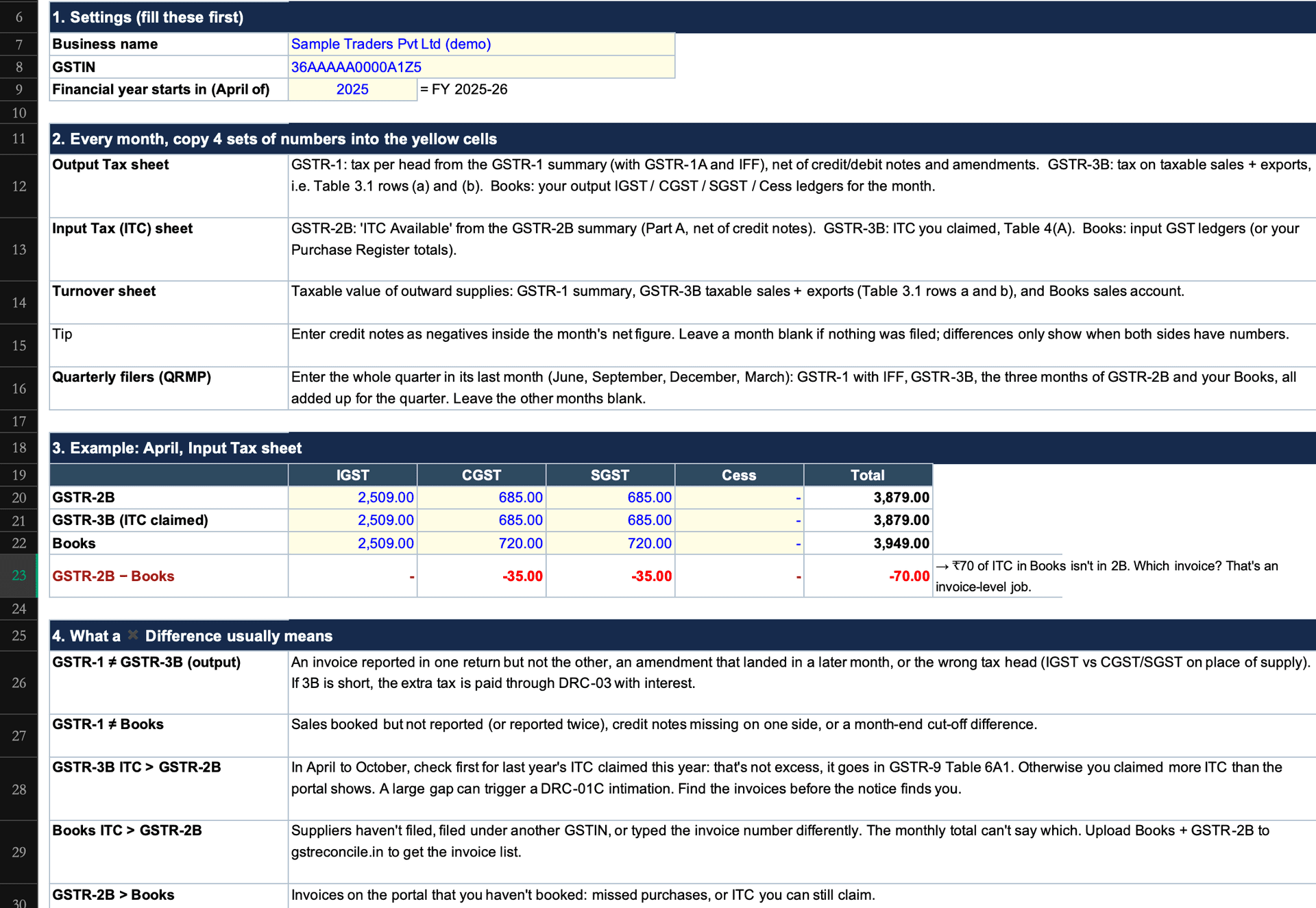
Fill the settings once, then copy the numbers into the yellow cells for each month. Those are the only cells you type into; the Total, Difference and Status columns fill themselves.
On How to use, enter the business name, GSTIN and the year the financial year starts (2025 for FY 2025-26). The month labels follow from that, so the same file works for any year.
Three blocks (GSTR-1, GSTR-3B, Books), each with IGST, CGST, SGST and Cess typed separately.
Three blocks (GSTR-2B, GSTR-3B, Books), each with IGST, CGST, SGST and Cess typed separately.
One number per source: the taxable value of your sales, without GST.
Every ✖ Difference is a month to open.
Two rules: enter credit notes as negatives inside the month's net figure, and leave a month blank if nothing was filed. A difference only shows when both sides have numbers.
Filing quarterly under QRMP? Enter the whole quarter in its last month (June, September, December, March): GSTR-1 with IFF, GSTR-3B, the three months of GSTR-2B and your books, all added up for the quarter. Leave the other months blank, so every source covers the same period.
Where to find each number
The GSTR-1, GSTR-3B and GSTR-2B figures all come from the GST portal. Here's how to open them:
Use the login link below, with the client's username and password.
Services → Returns → Returns Dashboard.
Select the financial year, the quarter and the month, then Search.
On the GSTR-1, GSTR-3B or GSTR-2B tile, click View, or download the filed return as a PDF (GSTR-2B also downloads as Excel). Then take the numbers the table below points to.
Log in to the GST portal (services.gst.gov.in) ↗. Your books figures come from the ledger reports in Tally or whatever accounting software you use.
| Sheet | Number | Where to find it |
|---|---|---|
| Output Tax | GSTR-1, tax per head | The filed GSTR-1 (or IFF) for the month → its summary: the total IGST, CGST, SGST and Cess, net of credit/debit notes and amendments. If you filed GSTR-1A, add its changes |
| Output Tax | GSTR-3B, tax per head | The filed GSTR-3B → Table 3.1, rows (a) and (b): the Integrated, Central, State/UT tax and Cess columns, two rows added |
| Output Tax | Books, tax per head | Your Output IGST, CGST, SGST and Cess ledgers: the month's net credit (tax on sales minus tax on credit notes) |
| Input Tax (ITC) | GSTR-2B, ITC per head | The month's GSTR-2B → Summary → "ITC Available", net of credit notes. The summary shows which GSTR-3B table each line feeds |
| Input Tax (ITC) | GSTR-3B, ITC claimed | The filed GSTR-3B → Table 4(A): the total of all its rows (imports, reverse charge, ISD and all other ITC), before the reversals in 4(B) |
| Input Tax (ITC) | Books, ITC per head | Your Input IGST, CGST, SGST and Cess ledgers for the month, or the tax totals of your Purchase Register |
| Turnover | GSTR-1, taxable value | The same GSTR-1 summary: the total taxable value, net of credit/debit notes |
| Turnover | GSTR-3B, taxable value | Table 3.1, rows (a) and (b): the Total Taxable Value column, two rows added |
| Turnover | Books, taxable value | Your taxable sales ledgers for the month, net of sales returns, without GST. Leave out exempt and nil-rated sales |
Example: April in the demo file
Here's one month typed in, from the demo company (Sample Traders Pvt Ltd). The figures are the same in all three sources, so April comes out clean:
- Output Tax, in each of GSTR-1, GSTR-3B and Books: IGST 21,600, CGST 36,900, SGST 36,900, Cess 0.
- Input Tax (ITC), in each of GSTR-2B, GSTR-3B and Books: IGST 11,880, CGST 22,878, SGST 22,878, Cess 0.
- Turnover, in each of GSTR-1, GSTR-3B and Books: 5,30,000.
Every Difference column shows "-" and April's Status reads ✔ Matched. Change one figure, say IGST in GSTR-3B to 21,500, and the 100 shows up in red with ✖ Difference against April.
GSTR-1 vs GSTR-3B: output tax and turnover
GSTR-1 and GSTR-3B should report the same outward tax for the same month. When they don't, either tax was short-paid in 3B or GSTR-1 is wrong. Each case has its own fix.
The demo company in the file (Sample Traders Pvt Ltd) shows three cases you'll see in real clients:
- June: tax short-paid in 3B. GSTR-1 shows IGST of ₹25,200; GSTR-3B shows ₹20,700. Turnover tells the same story: ₹5,92,000 in GSTR-1, ₹5,67,000 in 3B. A ₹25,000 inter-state invoice at 18% went into GSTR-1 and was missed in 3B. The ₹4,500 is payable through DRC-03, with interest.
- September: the totals match, and it's still wrong. GSTR-1 and GSTR-3B both total ₹1,06,560. But GSTR-1 has IGST ₹9,000 lower and CGST and SGST ₹4,500 higher each. An inter-state sale was reported in GSTR-1 as intra-state, with the wrong place of supply, so your customer's GSTR-2B shows the credit in the wrong heads. Amend the invoice in a later GSTR-1.
- December: in the books, in neither return. Books show CGST and SGST ₹4,500 higher each, and sales ₹50,000 higher (₹6,37,000 vs ₹5,87,000). A sale was booked but never reported. It has to go into a GSTR-1, with the tax paid.
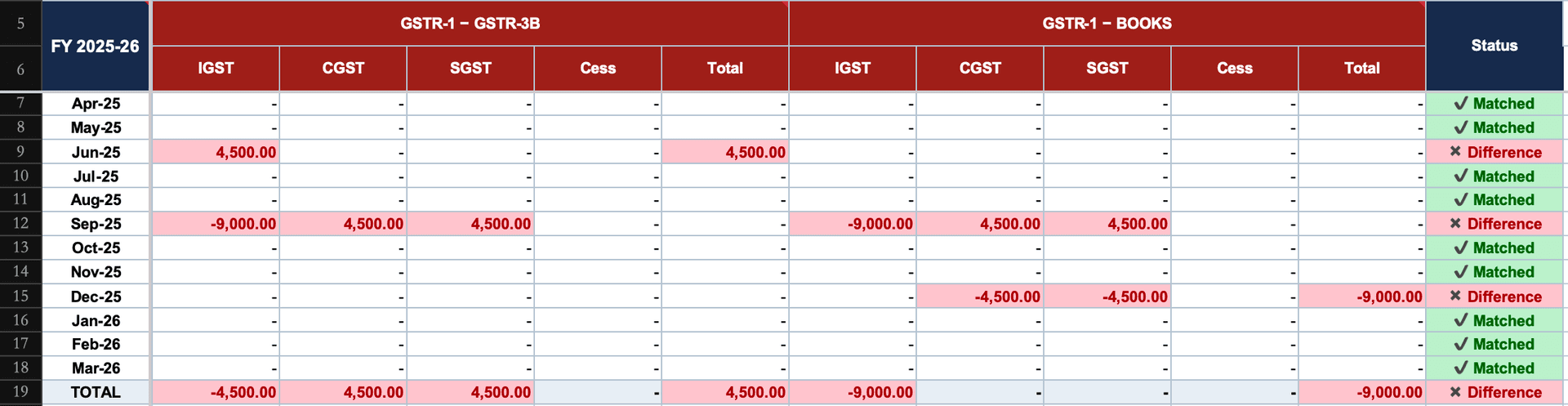
September is the reason the sheet compares per head. A totals-only reconciliation marks it Matched. The year totals hide it too: the September error and the June short-payment net into one muddled IGST figure.
Matching totals don't make a matched month. IGST reported as CGST + SGST balances to the rupee and is still a wrong return.
GSTR-3B vs GSTR-2B vs Books: ITC for the year
The Input Tax sheet answers three questions for every month. Did you claim more ITC in 3B than 2B shows? Is there ITC in 2B that you never claimed? Do your books carry ITC the portal doesn't?
The demo file shows all three:
- August: 3B claimed ₹12,000 more IGST than 2B. 2B shows ₹8,712; 3B and the books show ₹20,712. Check first whether this is last year's ITC claimed this year. In April to October that's common, and it goes in GSTR-9 Table 6A1, not counted as excess. If it isn't, you've claimed credit the portal doesn't show. A large enough gap triggers a DRC-01C intimation under Rule 88D, so find the invoices before the notice does.
- November: ₹5,400 of IGST in 2B that nobody claimed. 2B shows ₹20,250; 3B and the books show ₹14,850. These are purchases on the portal that were never booked. The only place left to claim them is a GSTR-3B filed by 30 November after the year ends, or before you file GSTR-9 if that's earlier. GSTR-9 itself can't create the credit. (More on the Section 16(4) ITC deadline.)
- May: the books carry ₹7,200 more ITC than 2B. 2B and 3B both show CGST and SGST of ₹21,483; the books show ₹25,083 each. The claim was right; the books are ahead of the portal. That's usually a supplier who hasn't filed, an invoice filed under the supplier's other GSTIN, or an invoice number typed differently.
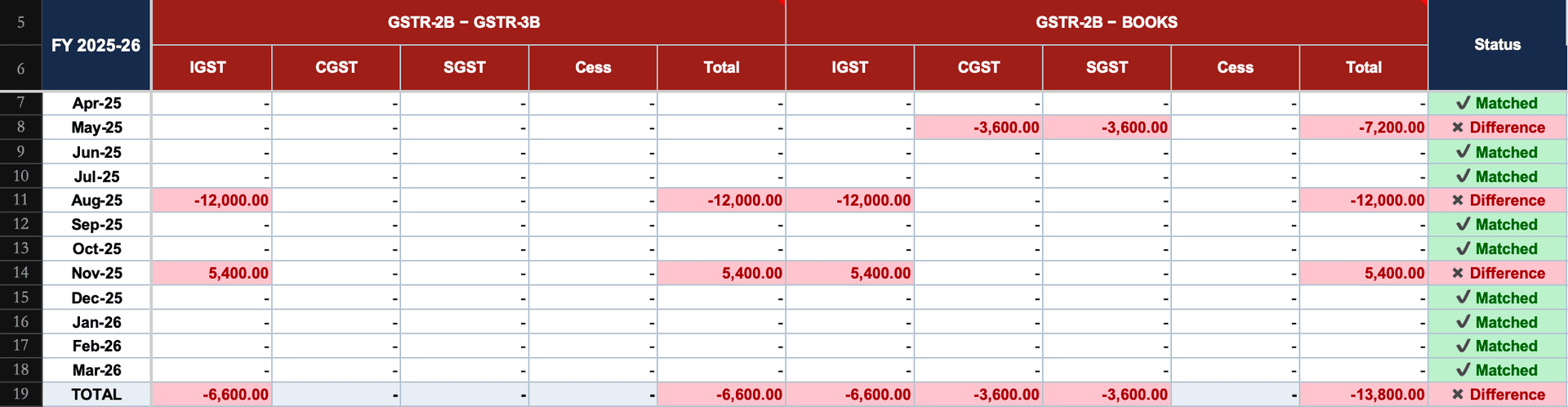
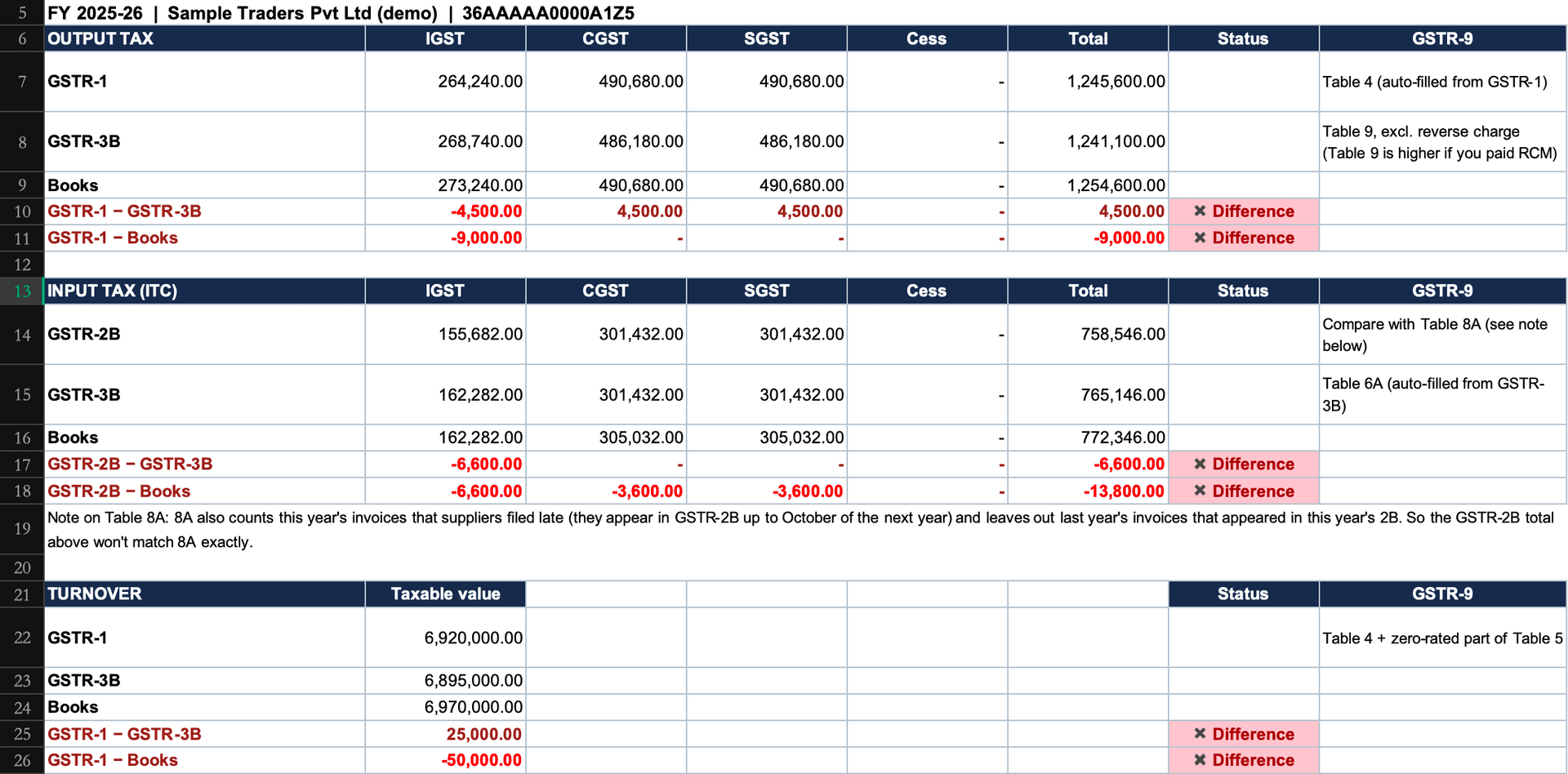
Look at what the year totals do to this. Annual 3B ITC is ₹7,65,146 against 2B's ₹7,58,546: a ₹6,600 gap. That's August's ₹12,000 over-claim minus November's ₹5,400 under-claim. One is a notice risk and the other is credit about to lapse, and the year view nets them into a number that explains neither. Month by month, they're two separate jobs.
Where the year totals land in GSTR-9
The Annual Summary adds up the twelve months and labels each line with the GSTR-9 table to compare it with. The auto-drafted GSTR-9 on the portal remains the reference; the sheet tells you which of its figures you'll need to explain.
| Year total in the sheet | GSTR-9 table | What to expect |
|---|---|---|
| Output tax, GSTR-1 | Table 4 (auto-filled from GSTR-1, 1A and IFF) | Should tie, if amendments landed in the same year |
| Output tax, GSTR-3B | Table 9 (tax payable and paid) | Table 9 is higher if you paid reverse-charge tax (3B 3.1(d)), which the sheet leaves out |
| Turnover, GSTR-1 | Table 4 + the zero-rated part of Table 5 | Nil, exempt and non-GST supplies sit in Table 5 and aren't in the sheet's turnover |
| ITC, GSTR-3B | Table 6A (auto-filled from 3B) | Should tie. Last year's ITC inside it is separated out in 6A1 |
| ITC, GSTR-2B | Table 8A | Won't tie exactly (see below) |
Why your Table 8A won't match your GSTR-2B total. Table 8A is built from GSTR-2B, but not as the April-to-March total. Per GSTN's FAQ on GSTR-9, it also includes the year's invoices that suppliers filed late, which appear in GSTR-2B from April to October of the next year. And it excludes the previous year's invoices that appeared in this year's 2B between April and October. A gap between the sheet's 2B total and 8A is expected; the job is to explain it, not force it to zero. (Table 8A draws on GSTR-2B, not 2A; the GSTR-2A vs GSTR-2B guide explains why the static statement is the one that counts.)
Table 8D is 8A − (8B + 8C), and 8B is auto-filled from Table 6B, your B2B ITC only. So the sheet's 2B-vs-3B gap will differ from 8D by any import, reverse-charge or ISD credit in your 3B.
The sheet is a pre-check, not a GSTR-9 working. It doesn't fill Tables 4 to 14, the GSTR-9C reconciliation, or rate-wise splits. Its job is to tell you which months to fix before you start on those.
What a ✖ Difference usually means
Each kind of difference has a short list of usual causes. Start with these before you open the invoices:
| Difference | Usual cause | What to do |
|---|---|---|
| GSTR-1 ≠ GSTR-3B (output) | Invoice in one return but not the other; an amendment that landed in a later month; wrong tax head (place of supply) | If 3B is short, pay through DRC-03 with interest; if GSTR-1 is wrong, amend it in a later GSTR-1 |
| GSTR-1 ≠ Books | Sales booked but not reported, or reported twice; credit notes missing on one side; month-end cut-off | Report the missing supply; match the cut-off |
| GSTR-3B ITC > GSTR-2B | Last year's ITC claimed this year (Table 6A1); supplier filed late; excess claim | Separate the prior-year credit; check the later 2B; reverse genuine excess |
| Books ITC > GSTR-2B | Supplier hasn't filed, filed under another GSTIN, or typed the invoice number differently | Find the invoices behind it (next section) |
| GSTR-2B > Books | Purchases on the portal that were never booked | Book them; claim eligible credit by 30 November after the year ends |
What this sheet can't tell you: which invoice
The sheet finds the month. It can't find the invoice, because a monthly total has no invoices in it. "Books ITC is ₹7,200 more than 2B in May" could be one supplier who never filed. Or an invoice typed as INV0123 in your books and INVO123 on the portal. Or a bill filed under the supplier's GSTIN for another state. The total looks the same in every case.
That's the job of GST Reconcile. Upload May's Books (in the Books template) and May's unmodified GSTR-2B portal file. It matches them invoice by invoice, B2B and credit/debit notes separately, through 21 rules, and gives each row its reason:
- It cleans invoice numbers before comparing: O-for-0 typos, FY prefixes, leading zeros.
- It pairs Cross-PAN filings under the supplier's other GSTIN.
- It flags duplicates in Books and in 2B separately.
- The GSTIN Summary shows ITC at risk per supplier in rupees, sorted so you know which vendor to call first.
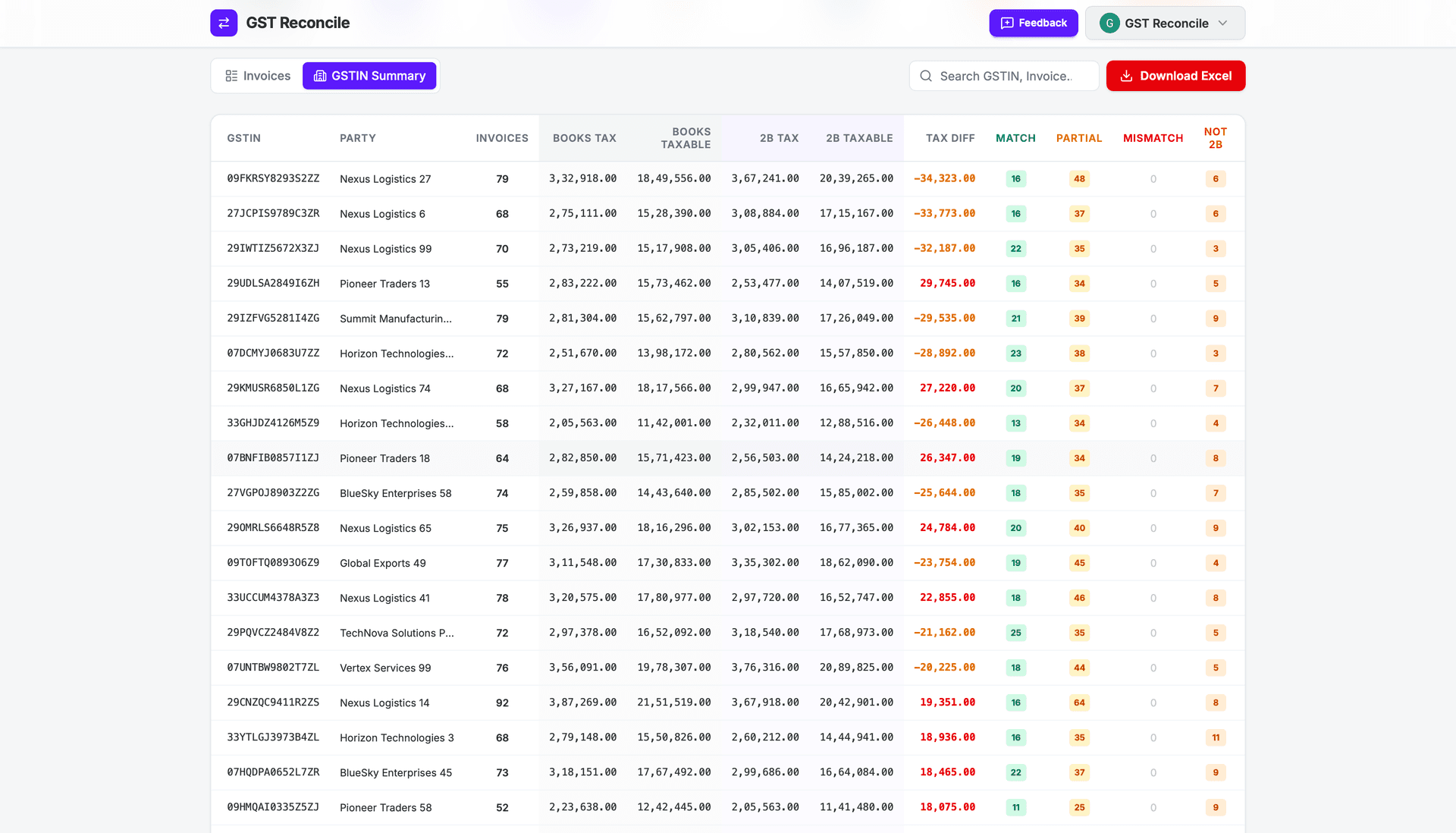
It doesn't reconcile GSTR-1, GSTR-3B or GSTR-9; this sheet does the returns-level check. If you'd rather stay in Excel for the invoice-level match too, the free invoice-level GSTR-2B vs Books reconciliation in Excel pairs Books with GSTR-2B by GSTIN + invoice number. For the full monthly workflow, see the GSTR-2B reconciliation guide.
Ten minutes with the sheet before GSTR-9 tells you which months need opening. In the demo file that's 6 of 12. The other six you can sign off.
Frequently Asked Questions
What is the due date for GSTR-9?
31 December after the end of the financial year, for both GSTR-9 and GSTR-9C, unless the government extends it. Check the GST portal for any extension before you rely on the date.
Is GSTR-9 mandatory if turnover is below ₹2 crore?
No. GSTR-9 is optional for taxpayers with aggregate turnover up to ₹2 crore. Above that it's mandatory, and GSTR-9C (self-certified) also applies above ₹5 crore.
How do I reconcile GSTR-1 with GSTR-3B in Excel?
Put each month's tax per head from the GSTR-1 summary next to GSTR-3B Table 3.1 rows (a) and (b), and take the difference for IGST, CGST, SGST and Cess separately. Compare taxable value the same way. A per-head check catches a wrong tax head even when the monthly totals match. The free sheet on this page does this for all twelve months.
Why doesn't my GSTR-9 Table 8A match my GSTR-2B total for the year?
Table 8A isn't the April-to-March total of your GSTR-2B. It also counts the year's invoices that suppliers filed late (they appear in GSTR-2B up to October of the next year), and it leaves out the previous year's invoices that appeared in this year's 2B between April and October. Expect a gap, and explain it.
What happens if the ITC claimed in GSTR-3B is more than GSTR-2B?
A large gap can trigger a DRC-01C intimation under Rule 88D. Check first whether it's last year's ITC claimed this year: that goes in Table 6A1 and isn't excess. Otherwise find the invoices behind it and reverse or explain them.
Can I still claim ITC I missed during the year?
Only in a GSTR-3B filed by 30 November after the year ends, or by the date you file GSTR-9 if that's earlier (Section 16(4)). GSTR-9 itself can't be used to claim missed credit, so filing it early closes the window early.
Can GSTR-9 be revised after filing?
No. There's no facility to revise GSTR-9 once filed, which is why the reconciliation has to come first. A difference found later can only be paid through DRC-03 or explained in reply to a notice.
Does the sheet work in Google Sheets and WPS? Is it really free?
Yes to both. It uses basic formulas, no macros, and works in Excel, WPS and Google Sheets. It's a free download with no sign-up, and it works for any financial year: you type the year once in the settings.
Does GST Reconcile file or reconcile GSTR-9?
No. GST Reconcile matches your Books against GSTR-2B invoice by invoice, B2B and credit/debit notes. Use this sheet to find the month with a difference; use GST Reconcile to find the invoices behind an ITC gap.
Reconcile Your GSTR-2B Free
No VLOOKUP gymnastics. Every mismatch comes with its reason.
Works with Tally, Busy & ClearTax. Up to 99.99% accurate.
Free plan, no card needed · ₹450+ Cr ITC Saved · 12.5M+ Invoices Matched