GSTR-2B Reconciliation: Complete FY 2026-27 Guide for CAs
Reconcile GSTR-2B with your purchase register for FY 2026-27. Step-by-step for CAs: match invoices, surface ITC at risk per supplier, file a clean GSTR-3B.
Current for FY 2026-27 (April 2026 – March 2027).
For a CA running monthly filings, GST reconciliation is the tedious part of the job that never goes away. Every month you match hundreds — sometimes thousands — of invoices between a client's Purchase Register and the auto-generated GSTR-2B, against the clock of the 20th.
With the GST portal becoming stricter about Input Tax Credit (ITC) claims under Section 16 of the CGST Act, a single mismatch or missed invoice can lead to blocked working capital or, worse, a department notice.
This guide walks through exactly how to perform a clean GSTR-2B reconciliation for FY 2026-27 — the normalization edge cases that trip up exact-match tools, the common errors to watch for, and how to turn an 8-hour Excel grind into an 8-second job using our free GSTR-2B reconciliation tool.
Why GSTR-2B is the Only Document That Matters
Earlier, practitioners reconciled against GSTR-2A. However, GSTR-2B is now the definitive, static statement generated on the 14th of every month. It dictates the exact eligible ITC a client can claim in that month's GSTR-3B.
Key rule: If an invoice is in your books but not in your GSTR-2B, you cannot claim the ITC. Reconciling your Books vs GSTR-2B is non-negotiable every month.

The GST Reconciliation Example (Step-by-Step)
Let's look at a practical GST reconciliation example. To reconcile successfully, you need two source files:
Step 1: Uploading the Data
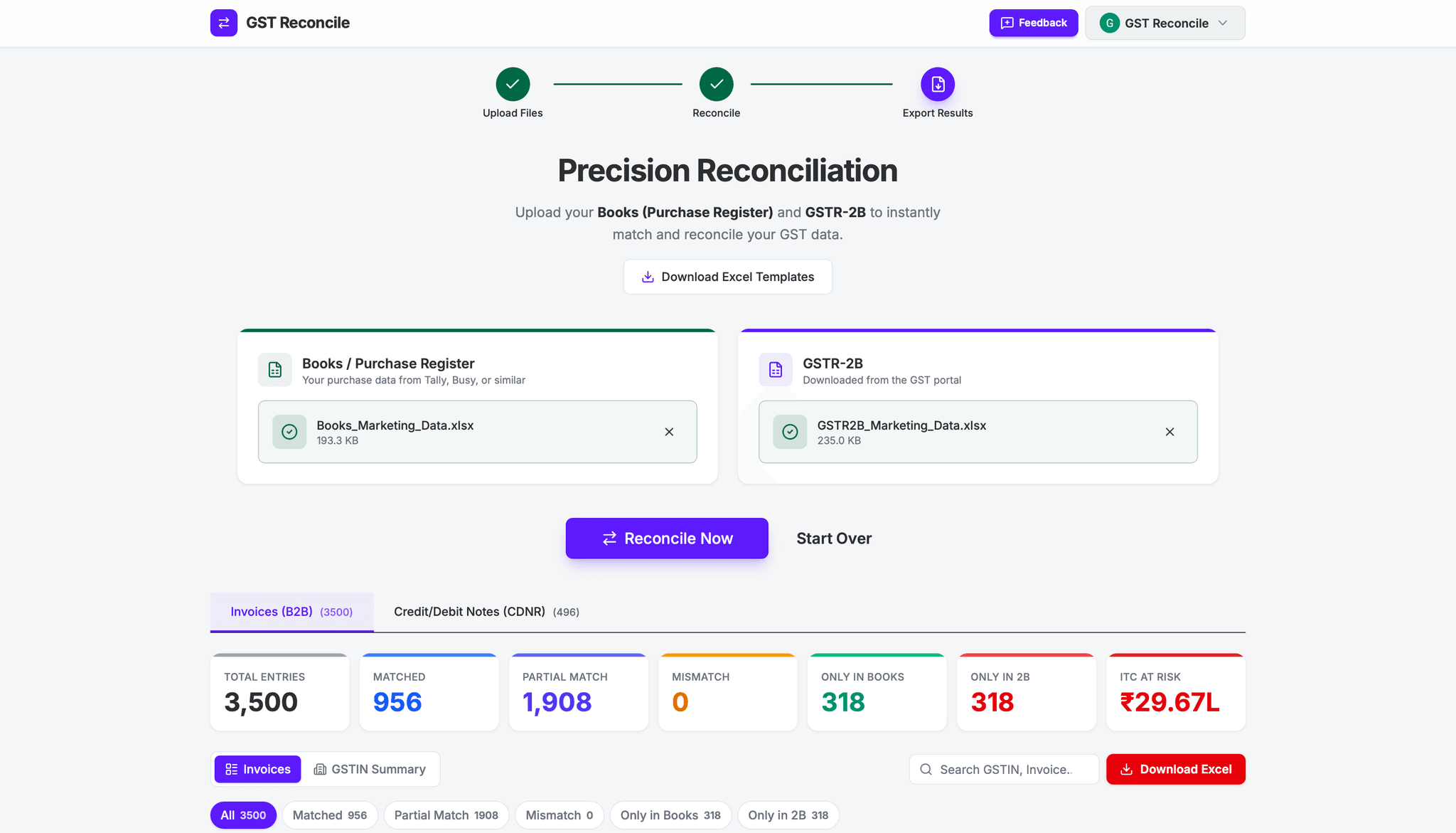
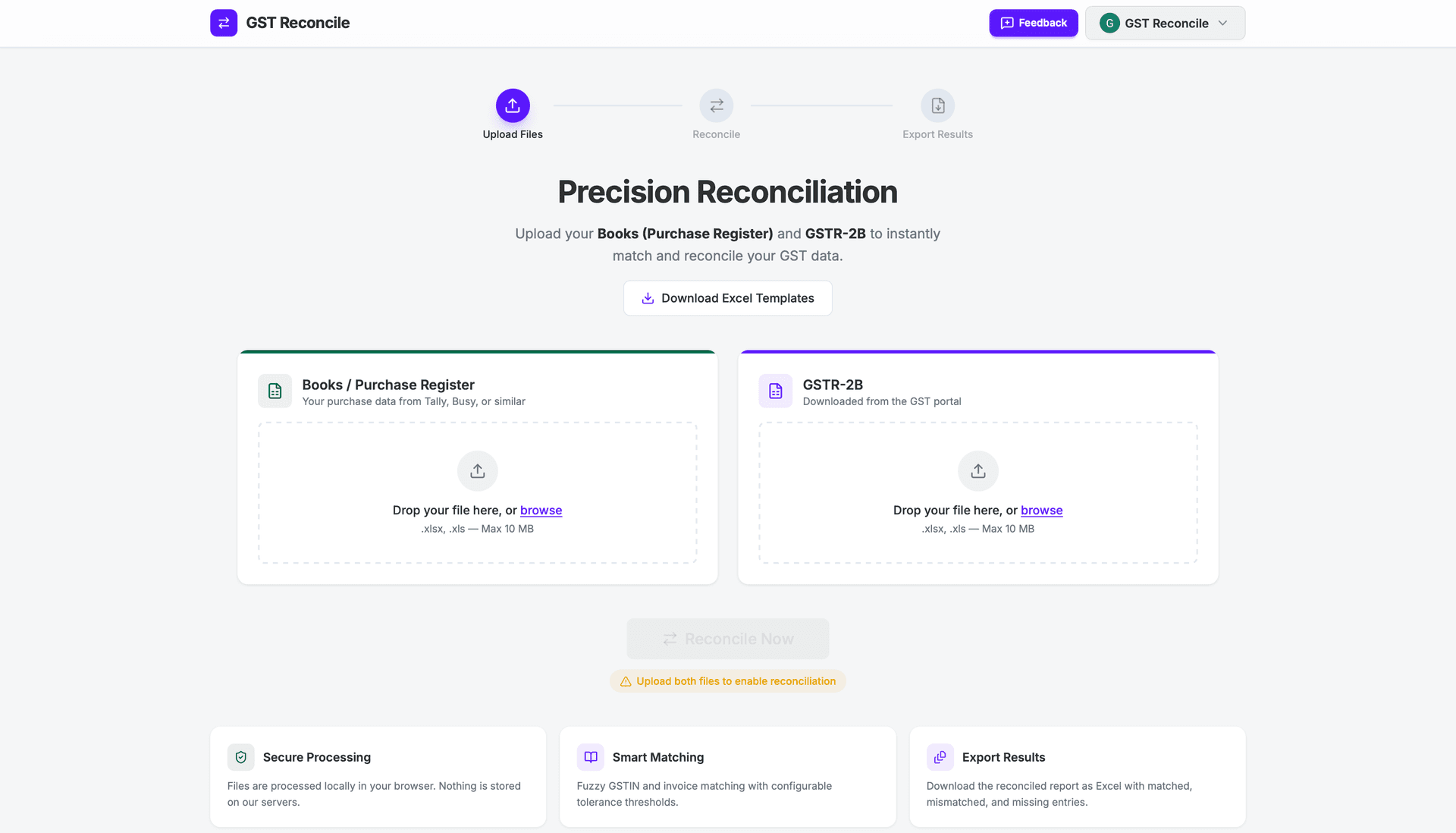
Instead of writing complex VLOOKUP formulas, most practitioners now run an automated tool. With GST Reconcile, you drag and drop your two files — your Books in the template and the unmodified GSTR-2B Excel from the portal.
Common Upload Errors and How to Fix Them
Before the reconciliation begins, the tool validates your uploaded files. Here are the most common errors you may encounter:
1. Missing Sheets in Books File

What it means: Your uploaded Books file does not contain the required B2B and B2B-CDNR sheets. This usually happens when you upload a raw Tally or ERP export instead of using our template.
How to fix: Download the Books Template from the dashboard, paste your purchase register data into the B2B sheet (and credit/debit notes into B2B-CDNR if applicable), and re-upload.
2. Missing Header Rows in Books File

What it means: The B2B sheet exists in your file, but the header rows are missing or have been modified. The tool expects standard column headers (GSTIN, Invoice No, Invoice Date, etc.) in the correct positions.
How to fix: Do not delete or modify the header rows in the template. Re-download a fresh Books Template, paste your data starting from the data rows, and re-upload.
3. Missing Columns in GSTR-2B File

What it means: Your GSTR-2B file is missing essential columns like Invoice Number, IGST, CGST, or SGST. This typically happens when you upload an edited version of the GSTR-2B file instead of the original download.
How to fix: Go to the GST Portal, download a fresh copy of your GSTR-2B Excel file, and upload it without making any changes.
4. Data Validation Errors in Books

What it means: Your Books file has data quality issues — invalid GSTIN numbers, missing invoice numbers, or missing invoice dates. The tool validates every row before reconciliation.
How to fix: Click "Download Error Report" to get a detailed Excel file highlighting the exact rows with errors. Fix the flagged issues in your Books file and re-upload.
Step 2: Instant Categorization
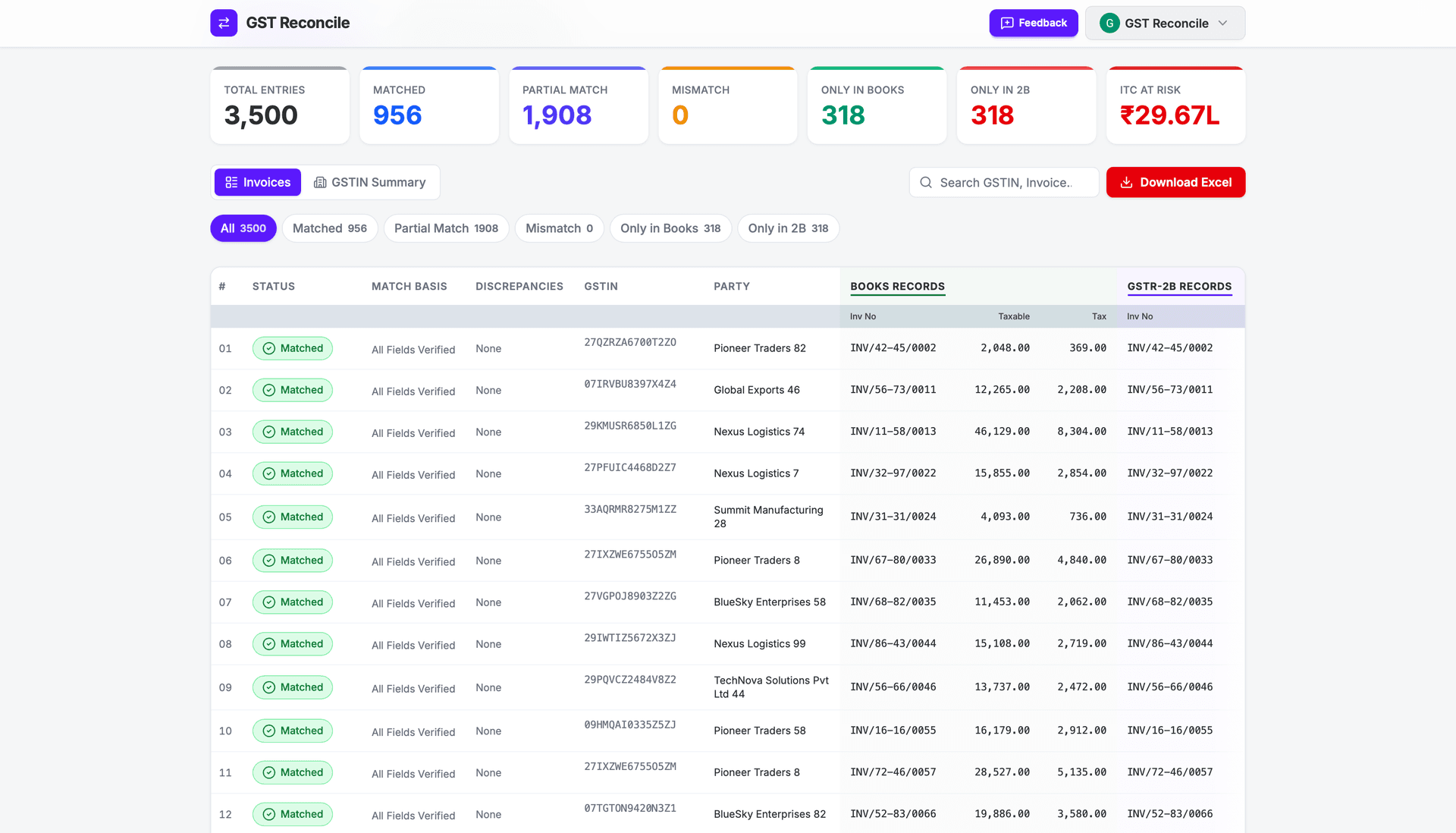
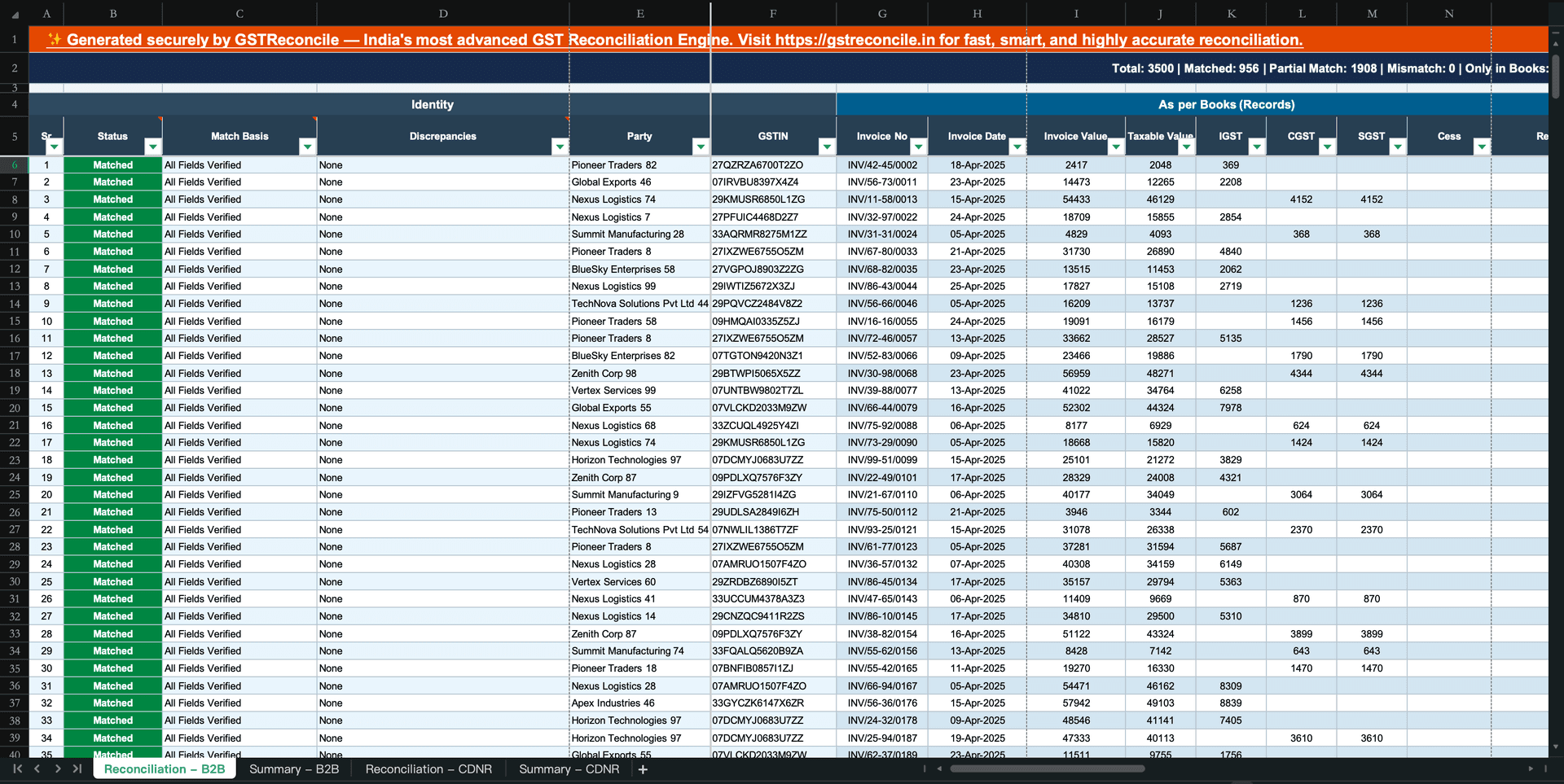
Once both files are in, the engine runs 21 deterministic rules over every invoice — not "AI," and not a single opaque score you can't defend in front of a notice. Before it compares two invoice numbers it puts each through normalization passes: a typo map (O→0, I→1, S→5), an FY-prefix strip (2025-26 → 2526), date-format normalization, and non-alphanumeric stripping (so INV/001 and INV-1 collapse to the same key). A ₹0.50 rounding gap in tax is tolerated; a wrong GSTIN is not. The results are categorized cleanly:
Categorizing is only half the job — the next question is what each status means for your credit. Our guide to classify which ITC mismatches are recoverable vs permanently lost walks through every mismatch bucket and the one decision to make for each before your Section 16(4) deadline.
Understanding the Results Table Columns
The results table provides detailed insights into every invoice. Three critical columns help you understand exactly why an invoice was categorized the way it was:
Explains exactly how we paired the records and which variables matched. E.g. "Full Invoice Match" or "Invoice Matched with Typos".
Highlights exactly what differs between your Books and 2B — tax amount, date, GSTIN. "None" means perfect match.
Plain-English explanation of the reconciliation decision so you never have to guess the status reason.
Step 3: Vendor Follow-ups & Download Report
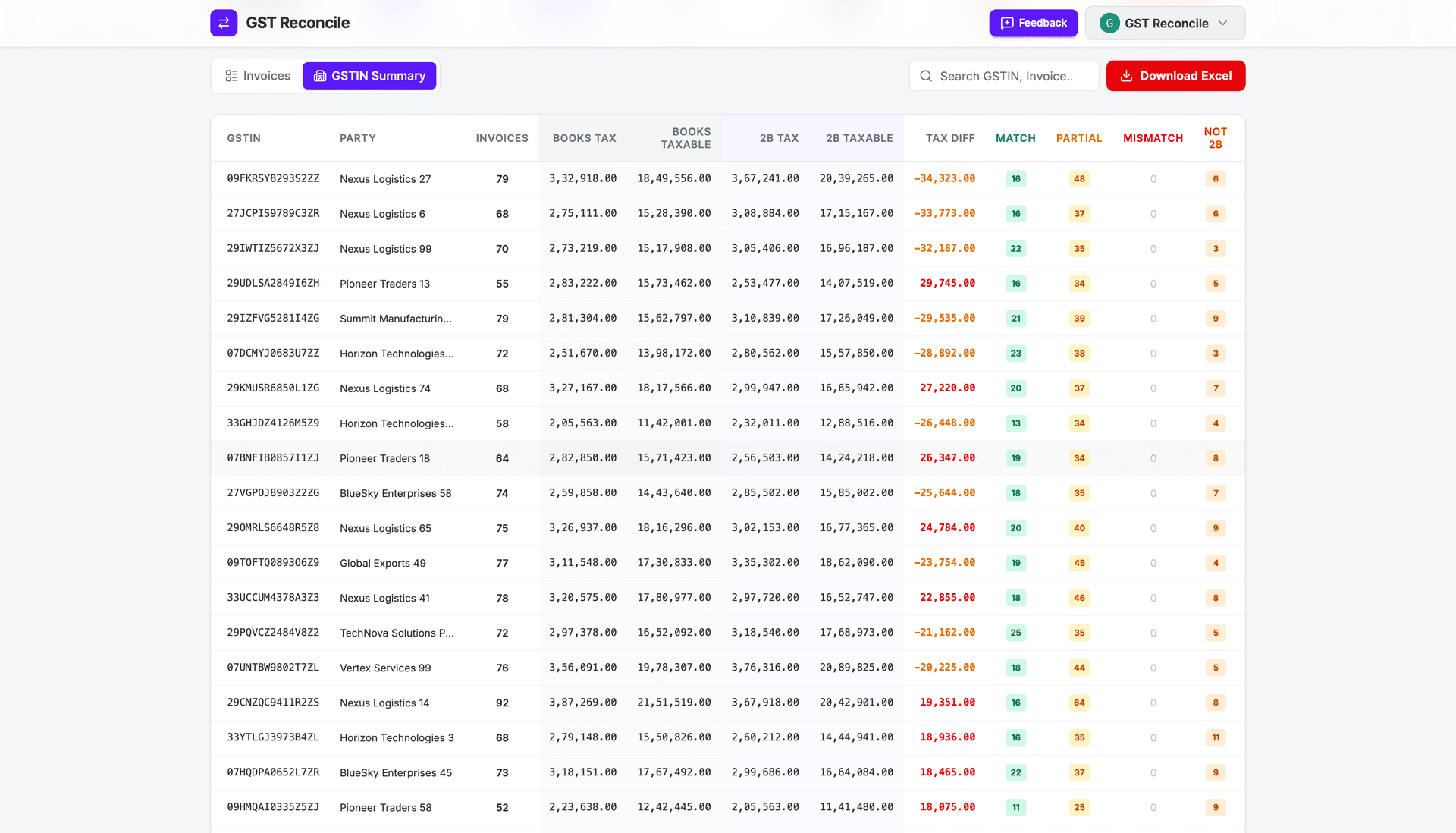
The biggest bottleneck is chasing vendors who haven't filed. The GSTIN Summary collapses every mismatch into the one view that drives action: ITC at risk per supplier, in rupees, sorted largest exposure first. The vendor sitting on ₹70,000 of a client's credit is your first call — not the one holding ₹400. Before you sign off, cross-check Totals & Checks — Books ITC against 2B ITC, side by side — so the month-end numbers tie out and nothing is silently double-counted. Then download the reconciliation report in colour-coded Excel for your file or to send the client.
Manual Excel vs. Automated Tools
While many professionals still search for a GST reconciliation format in Excel free download, relying on Excel at scale is dangerous. Excel struggles with:
- Handling leading zeros or special characters in invoice numbers (e.g.,
INV/001vsINV-1). - Finding partial matches — a ₹1 rounding error breaks a VLOOKUP.
- Processing thousands of rows without crashing.
If you want to build the sheet anyway, our GST reconciliation format in Excel walks through the exact columns, the XLOOKUP and ABS formulas that do the matching, and the points where the spreadsheet quietly costs you ITC.
The Automated Solution
With an automated engine like GST Reconcile, you bypass these issues entirely. The system exports a beautifully color-coded Excel report that is ready for your team or your clients.
GSTR-2A vs GSTR-2B: Why You Should Only Use GSTR-2B in FY 2026-27
GSTR-2A is a dynamic statement that changes every time a vendor files or amends their returns, making it extremely unreliable. GSTR-2B is static, generated on the 14th of every month, and is the legally mandated basis for claiming ITC under Rule 36(4).
Bottom line: If an invoice misses the 11th cutoff date for GSTR-2B, you must defer the ITC claim to the following month — regardless of what GSTR-2A shows.
The 5 Most Common GST Reconciliation Errors (And How to Fix Them)
Your vendor enters INV/001 but your books show INV-1. A traditional VLOOKUP treats these as two completely different invoices.
✦ Solution: GST Reconcile normalizes both numbers — slashes, dashes and leading zeros stripped — so the two collapse to a single match.
A tiny ₹0.50 rounding difference between your ERP and the portal breaks an exact Excel match.
✦ Solution: GST Reconcile tolerates a defined rounding band on tax, so a ₹0.50 gap is a partial match — not a miss.
Credit and Debit Notes are often accidentally skipped during manual reconciliation, throwing off your total tax liabilities.
✦ Solution: GST Reconcile automatically detects and separates B2B and CDNR entries to ensure your liabilities align perfectly.
Your vendor hasn't uploaded their GSTR-1, meaning the invoice doesn't appear in your GSTR-2B.
✦ Solution: Generate a one-click 'Only in Books' report to instantly identify defaulting vendors and chase them before the 20th.
An invoice is dated March, but the vendor filed it in their April return — it appears in April's GSTR-2B, not March.
✦ Solution: GST Reconcile flags it as Only in Books and surfaces the delayed-filing vendor, so you carry the credit to the month its invoice lands in 2B.
Frequently Asked Questions About GSTR-2B Reconciliation
What is GSTR-2B reconciliation?
GSTR-2B reconciliation is the process of matching every invoice in your Purchase Register (Books) with the invoices appearing in your auto-generated GSTR-2B statement. The goal is to identify which invoices match perfectly, which have discrepancies, and which are missing — so you can claim 100% of your eligible Input Tax Credit before the GSTR-3B filing deadline.
How do I reconcile GSTR-2B step by step?
Download the GSTR-2B Excel from the GST portal and put your client's Purchase Register into the Books template. Match every invoice on GSTIN and invoice number — after normalizing typos, FY prefixes and date formats — then classify each line as matched, partial match, or ITC at risk. Reconcile credit/debit notes (CDNR) in a separate pass, work the GSTIN Summary to chase suppliers by rupee exposure, and tie out Totals & Checks before you file GSTR-3B.
How often should I do GSTR-2B reconciliation?
Every month, without exception. GSTR-2B is generated on the 14th of each month and the GSTR-3B filing deadline is the 20th. This gives you a 6-day window to reconcile and resolve any mismatches before filing. Missing this window means either claiming incorrect ITC or losing ITC entirely.
What is the difference between GSTR-2A and GSTR-2B?
GSTR-2A is a dynamic statement that changes every time a vendor amends their filings — making it unreliable for reconciliation. GSTR-2B is a static statement generated on the 14th of each month and never changes. As per GST Council guidelines, GSTR-2B is now the correct document to use for ITC reconciliation and GSTR-3B filing.
What is the last date to claim ITC for FY 2026-27?
Under Section 16(4) of the CGST Act, the deadline is the earlier of 30 November 2027 or the date you file the GSTR-9 annual return for FY 2026-27. For monthly filers, the GSTR-3B for October 2027 (due 20 November 2027) is the last practical return. (For FY 2025-26 invoices, that wall is 30 November 2026.) Filing GSTR-9 early pulls the deadline forward, so finish your ITC review before you file the annual return.
What happens if I don't reconcile GSTR-2B before filing?
If you file GSTR-3B without reconciling, you risk claiming ITC on invoices not present in GSTR-2B (a violation of Section 16(2)(aa) of the CGST Act, resulting in a department notice), or missing ITC on invoices in GSTR-2B but not in your books. Both outcomes are costly — either penalties or lost working capital.
Is there a free tool for GSTR-2B reconciliation?
Yes. GST Reconcile is a free GSTR-2B reconciliation tool built specifically for Indian CAs and finance teams. Upload your Purchase Register and GSTR-2B file, and get an instant reconciliation report — matched invoices, partial matches, ITC at risk — in seconds. No signup required.
Start Reconciling Smarter
Stop wasting days on manual matching. You process up to 10MB of Excel files instantly, directly in your browser — reconciliation runs in the browser and your client's files never touch our servers. There's no upload step to breach, which is exactly what you want when you're holding 40 clients' purchase data.
Reconcile Your GSTR-2B Free
No VLOOKUP gymnastics. No data stored on external servers.
Works with Tally, Busy & ClearTax. Up to 99.99% accurate.
No signup required · ₹450+ Cr ITC Saved · 12.5M+ Invoices Matched